
Yellowbox Locks
A Simpler Smart Locking System
Provide Employees with a Seamless User Experience
The continued uncertainty of returning to the office poses a threat to the collaborative and community-focused workplace. Curating an office space that provides employees an effortless experience is crucial to the success of the hybrid workplace.
The office should be designed with the intent of creating a sticky office, a place where employees will be going out of their way to come into the office. By creating a this sense of FOMO, we regain the workplace camaraderie.
Not only is the layout, furniture and color choice important when redesigning the office, but the amenities that create seamless experiences will aid in the creation of the sticky office.

INTRO TO
YellowBox
Yellowbox wireless smart locks, is a leader in creating streamlined user experiences for practically any locker application for temporary or permanent-use to ‘click & collect’ exchange of goods lockers.
Give your agile workspace the flexibility it needs to continually adapt to the office environment. Providing your employees with a simple smart locking system that allows them to use their existing access cards or Yellowbox app to book or unlock their locker right from their smartphone.
- USER-APP
- MANAGEMENT APP
- ADMINISTRATIVE CONTROL

See for Yourself How Yellowbox Streamlines the Workplace Experience
No keys to manage, no middleman required. Open lockers with the touch of a button through bluetooth with RFID cards, straight from the Yellowbox App or even integrated straight from your company’s smart building app, plus a backup key with a 4-digit PIN is always an option. Lockers can be assigned or unassigned for temporary use.
The 24/7 in-app support ensures users that help is available whenever they need lock assistance. The simple user-experience does not reflect the extensive features that can be leveraged to create the desired user experience.

Seamless User Experience
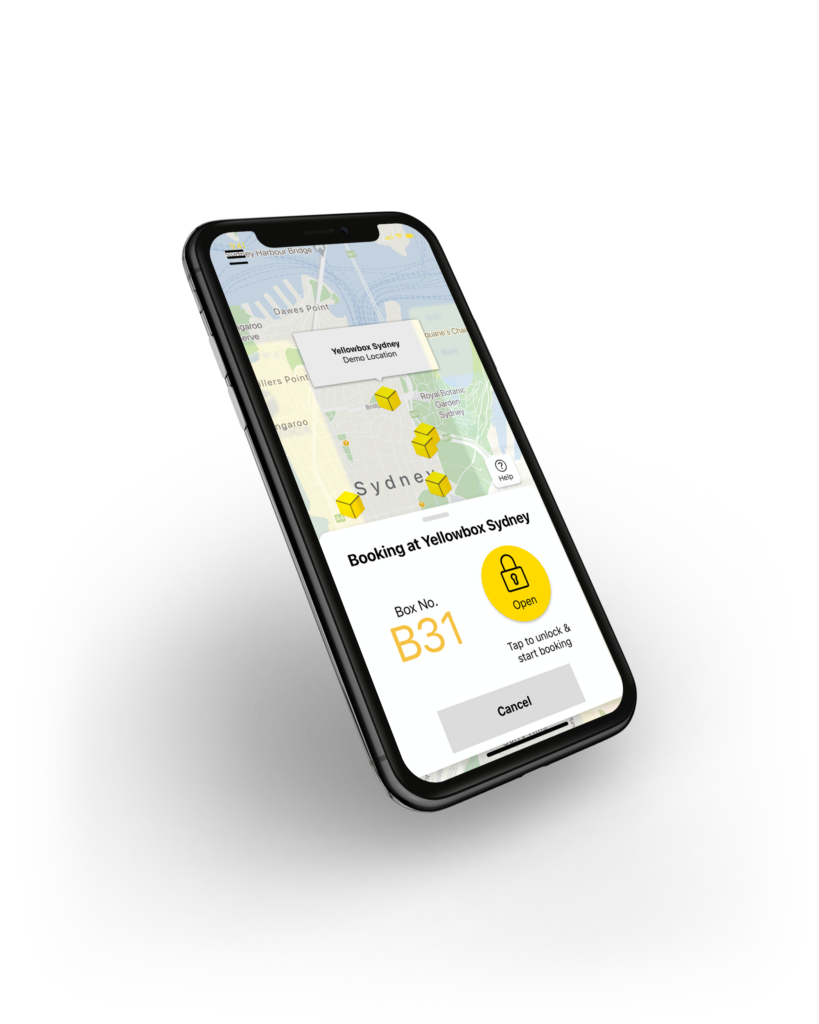
User App
No keys to manage, no middleman required. Open lockers with the touch of a button through bluetooth with RFID cards, straight from the Yellowbox App or even integrated straight from your company’s smart building app, plus a backup key with a 4-digit PIN is always an option. Lockers can be assigned or unassigned for temporary use.
The 24/7 in-app support ensures users that help is available whenever they need lock assistance. The simple user-experience does not reflect the extensive features that can be leveraged to create the desired user experience.
Optional Features:
- Charge for use
- Share locker with another user
- Member management software integration
- Transfer locker to another user
- Seamless SSO login

Management App
The manager app replaces all master keys, codes and cards with one simple app. Visually see which lockers are in-use or booked, available, unavailable, disabled, and reserved for use. Managers are also able to allocate a locker to a user or end a booking if someone has surpassed their allotted time. Gain insight into the history of who has used a specific locker and for the period of time it was in-use.
In addition to the locker insights, managers can also open lockers with a click of a button in the app. The ‘open-all’ button saves an abundance of time during security checks and routine cleanings. The app also allows managers to specify which lockers are intended for ADA use, ensuring the lockers are properly allocated and accessible to all.
With a battery powered lock, one of the main concerns is the battery life. The manager app provides a live view of the battery levels — the system ensures that the battery is equally distributed prolonging battery life. If a battery is low, a manager can manually disable a locker from use until the battery is changed.
Management Dashboard
In addition to the manager app, a web portal is available for managers as well. This dashboard provides a more extensive overview of all the lockers, current utilization and battery levels.
The management dashboard provides insight into locker usage over time and view audit trail logs. Also, create bookings and allocate lockers to users that don’t have the app. Plus, customize notifications that are sent for locker booking reminders and influence how users receive the notifications. Additional features include creating groups with specialized access to lockers, like cleaning crews, maintenance or other managers.


RFID Access
We’re not asking you to change the entire office. Yellowbox has a seamless integration with existing building access cards. The dashboard seamlessly integrates with RFID card readers ensuring the same real-time data and insights will be readily available. Simply add power to the end of each locker bank for the RFID card readers and continue on with a streamlined user experience.
take a deeper dive
download the yellowbox brochure
Yellowbox has taken a close look at how users want to use lockers and how management wants to administer and manage lockers. The Yellowbox software platform is designed for a simple and intuitive user experience but with all of the intelligence and reporting capabilities behind the scenes.
